

UploadWords.com is a free online toolkit that lets users understand the meaning of their text without having to navigate through complicated dashboards or sign up for yet another account.
However, is UploadWords.com USA toolkit a worthwhile site to use or simply another online tool that offers promises to make life easier? Its features, privacy stance, and usability helps to answer that question.
What Is UploadWords.com?
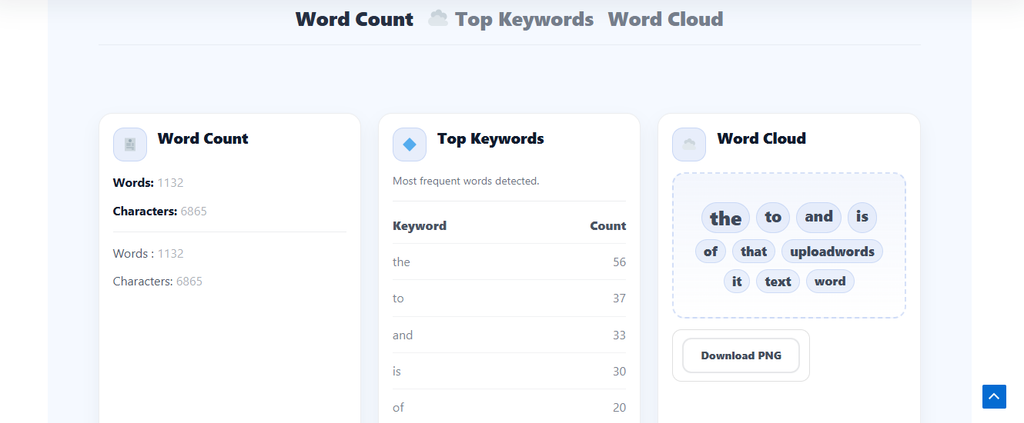
UploadWords.com is a free, privacy-focused text analysis toolkit designed to provide rapid analysis of written text. The primary function of the tool is called Upload Words, which enables users to paste text or upload a file to get a word count, character count, list of frequently used keywords, and a word cloud.
UploadWords does not ask users to register, sign up for a service, or navigate a complex interface, but rather deliver useful results with minimal effort. The main selling points of the platform are that it’s free, it doesn’t require a sign-up, it focuses on privacy, and it offers quick results.
Key Features: More Than Just a Word Counter

You can use a simple word counter to find out how many words you’ve written. UploadWords.com USA tries to take it one step further by revealing to the user what is contained in their text.
Word and character counting: Counts words and characters instantly. This can assist students to verify the length of assignments, writers to keep track of the length of their drafts, and marketers to review the content before sharing or publishing it. The platform claims that it cleans up extra spaces and symbols before counting the words.
UploadWords detects the words that are repeated and displays them in a list of frequencies. This can assist the user to identify repeated words in their text and to see at a glance what language they have used in a document.
It also has a stopwords toggle and a minimum word-length filter. These settings enable users to exclude common words and very short terms from the keyword results. This helps users to tweak the list to make the results more relevant to them.
Word cloud generation: The platform transforms the data of keywords into a word cloud. Users can see the result and download it as a PNG image.
The final visual will vary depending on the analysis settings, as the word cloud is based on the keywords list. The result is a feature that is simple text analysis with a handy presentation of the frequently used words.
Copying and automatic updates: If it is enabled, users can copy their word count and top keywords in one click. Results can be updated automatically as users type, after a brief delay.
These features are combined to make UploadWords more useful than a tool that just shows a number and sends users off.
Who Should Use UploadWords.com in USA?
The main target audiences of Uploadwords.com USA toolkit are students, writers, and marketers.
The tool provides students with a fast and easy way to determine the length of their essays, assignments, and projects. No one wants to find out that an assignment that was supposed to be a complete is missing a certain number of words.
The keyword list can be useful for writers to identify repetition in drafts. Frequently used words can be a good indication that it is time to review language and enhance readability.
The keyword analysis can be helpful for marketers to analyze content and get instant insights. Copying results and downloading a word cloud also makes it easier to share the results.
For users who require simple text statistics and keyword insights, a number of functions are available in one location without having to navigate a complex dashboard. But the platform’s documented capabilities are geared towards text analysis. If you’re looking for a complete writing and editing package, you need to be aware of that.
Privacy and Security: What Users Should Know

Privacy is a key component of UploadWords’ stated plan. The platform claims that the text is analyzed in the user’s browser and not published as a public document. The service also claims it doesn’t save text as a public document or sell or share users’ text content with third parties. These are comforting words for those who are frequently tasked with writing essays, reports, drafts, and other written documents.
While the platform claims to be privacy-focused, users should be aware that the service’s privacy policies are not necessarily the same as the security assurances that are verified independently. The information provided does not imply that the tool has been independently security audited.
The approach described here might be attractive for normal writing jobs. Caution is still warranted for very sensitive information.
File Support and Possible Limitations
UploadWords has fairly limited file requirements, but it’s best to be aware of the limits before uploading a document. The tool is currently available for plain text (.TXT).
Maximum file size is 4MB. DOCX support may be added in the future, but is not currently supported. This means that users who have Word documents might need to copy their text into the tool or prepare the documents in a supported format first.
The platform also provides troubleshooting suggestions. If it does not upload, users should check that the file is a TXT document, that it is less than 4 MB, refresh the page, or try a different browser (Chrome is recommended).
Adding text, refreshing the page, disabling an ad blocker for the page, or clearing the cache may help if the Analyze button doesn’t do anything.
Best Free UploadWords.com USA Alternatives
1. Keynou Word Counter
Keynou‘s text analysis is easy. It has a word counter feature that counts words, characters, sentences, paragraphs and reading time. Word Counter Pro includes keyword density analysis for SEO purposes. Everything runs in your browser, without registration, uploads or advertising clutter.
2. WordCounter.net
WordCounter.net is more than just a word counter. It measures word and character count, predicts reading level and analyzes keyword density. Quick checks, as results are updated as you edit. There are ads taking up some space, but it still serves a purpose. It’s a convenient option for writers who require basic SEO metrics in addition to regular word counts.
3. Count Wordsworth
The number of words is not a good indicator of the difficulty of prose. In addition to its normal measurements, Count Wordsworth adds the average word length and syllable counts. These numbers can be used by writers to look at vocabulary and sentence complexity. The browser-based tool is free and is suitable for anyone who wants a more detailed analysis of the text.
4. Word Counter by Slick Write
Slick Write analysis readability, passive voice, sentence variety and other aspects of prose. The additional functions can be confusing for those who only require a quick count. However, writers can use these findings to discover repetitive patterns and enhance the structure of sentences.
Final Verdict: Is UploadWords.com USA Tool Worth It?
There’s a simple selling point to be made about UploadWords.com USA: it’s free, doesn’t require an account, provides rapid text statistics, offers keyword analysis, and offers downloadable word clouds. It’s most attractive feature is its convenience.
There are limitations, though. Currently, only TXT is accepted for uploads, which are limited to 4MB and users with sensitive data should be careful. Some features such as one-click copying may also rely on their being enabled on the tool page. For those who require an easy-to-use and lightweight tool for text analysis, UploadWords.com is a good option.
It is not marketed as an all-in-one writing tool, and its reported functionality doesn’t seem to indicate that it is intended to be one. On this basis, UploadWords provides a viable solution. If you’re doing simple text analysis, this might suffice.